Document Classification Software: Buyer’s Guide
Document classification software is transforming how businesses manage their documents. It automates the organization and categorization of documents based on content. This technology reduces manual sorting and filing tasks, boosting efficiency.
In today’s fast-paced business world, managing documents effectively is crucial. Document classification software offers a solution. It ensures that sensitive information is properly categorized and protected. This enhances data security.
Choosing the right software can be daunting. There are many options available, each with unique features. Key features to consider include AI and machine learning capabilities. Integration with existing systems is also important.
Scalability is another critical factor. Your chosen software should accommodate future growth and increased data volumes. Cloud-based solutions offer flexibility and remote access. On-premises solutions may provide more control over data.
This guide will help you navigate the options. It will provide insights into features, benefits, and considerations. You’ll be equipped to make an informed decision.
What Is Document Classification Software?
Document classification software is a tool that organizes and categorizes documents automatically. It uses advanced algorithms to analyze document content. This helps in categorizing documents into predefined groups.
The software identifies key aspects like text content and metadata. It streamlines document handling by reducing manual effort. This automation is beneficial for maintaining organized digital records.
Advanced document classification tools often feature artificial intelligence and machine learning. These technologies enhance accuracy and adaptability. They can evolve with changing organizational needs and document types.
Document classification software can sort and label a wide range of documents. From emails to PDFs and scanned images, the variety is vast. This flexibility makes it versatile for different business environments.
Benefits of these tools include:
- Improved organization and retrieval of documents
- Enhanced data security through better categorization
- Reduced manual filing efforts
These features help businesses operate more efficiently. By providing structured document management, such software contributes to streamlined operations and increased productivity.

Why Your Organization Needs Document Classification
Efficient document management is critical for any business. Document classification software plays a vital role in achieving this. It provides a structured approach to organizing digital assets.
Manual document sorting can be time-consuming. Automating this process significantly reduces workload. It allows staff to focus on more critical tasks and decision-making.
Data security is a significant concern for organizations. Document classification tools help protect sensitive information. By categorizing data correctly, they ensure compliance with industry regulations.
Key reasons to adopt document classification software include:
- Enhanced data security
- Improved efficiency in handling documents
- Better compliance with regulations
Organizations often struggle with document retrieval. Misplaced or improperly categorized files can lead to inefficiencies. With classification software, retrieval becomes faster and more accurate. This leads to increased productivity and reduced frustration among staff.

Key Features to Look For in Document Classification Software
When choosing document classification software, key features are crucial. These features determine how well the software will perform in your organization.
The first important feature is artificial intelligence and machine learning capabilities. These technologies enhance the software’s ability to accurately classify documents. They help the system improve over time by learning from data patterns.
Integration capabilities are another essential feature to consider. The software should easily connect with existing enterprise systems. This ensures a seamless flow of information across different platforms.
User-friendly interfaces can greatly impact adoption and efficiency. Ensure the software has an intuitive design. Employees will find it easier to use, minimizing learning curves.
Security features are paramount. Look for robust encryption and access control options. This helps protect sensitive information from unauthorized access.
Important features to consider include:
- AI and machine learning for improved accuracy
- Seamless integration with current systems
- Intuitive user interfaces
Scalability is also a major consideration. Software should grow with your business needs. This ensures it can handle increased data volumes over time.
Another critical feature is comprehensive search and retrieval functionalities. They allow users to find documents quickly and efficiently. This feature significantly reduces time spent on searching documents.
- Robust security and encryption
- Scalability to meet future demands
- Efficient search and retrieval functions
Lastly, consider the vendor’s support and update policies. Good customer support is invaluable. Regular updates ensure the software stays current with emerging needs.
Selecting the right features guarantees your document classification software will be a valuable asset. These capabilities improve efficiency, security, and overall document management.

by Levart_Photographer (https://unsplash.com/@siva_photography)
Types of Document Classification Solutions
Document classification solutions come in various types to meet different needs. Understanding these types helps in selecting the right fit for your organization.
The first type is rule-based classification. This method uses predefined criteria to sort documents. It’s suitable for organizations with structured data and clear classification rules.
Machine learning-based solutions are increasingly popular. They use algorithms to learn from data patterns. These solutions are ideal for handling large volumes of unstructured data.
A hybrid approach combines rule-based and machine learning techniques. It provides flexibility, accommodating both structured and unstructured data.
Common types of document classification solutions include:
- Rule-based classification
- Machine learning-based classification
- Hybrid classification
Finally, industry-specific solutions tailor functionalities for particular sectors. These solutions incorporate compliance and regulatory requirements. They are beneficial for businesses in highly regulated industries.
Each type offers unique benefits. Your choice should align with your data complexity, business goals, and compliance needs.

by Beatriz Pérez Moya (https://unsplash.com/@beatriz_perez)
How Document Classification Software Works
Document classification software streamlines the sorting and organizing of documents. This process is essential for efficient information management.
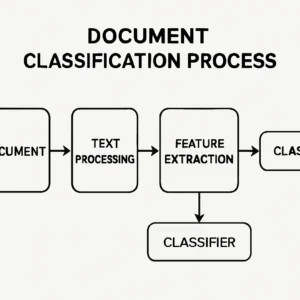
First, the software analyzes document content. It uses text recognition to identify keywords and phrases. This step sets the foundation for accurate classification.
Next, the software applies classification rules. These rules can be predefined or learned through machine learning. The goal is to categorize documents based on content.
The final step involves storing the classified documents. This can be done in a centralized database for easy retrieval. Proper storage ensures documents are accessible when needed.
Key processes involved in document classification include:
- Content analysis
- Application of classification rules
- Centralized storage
The software adapts over time, improving accuracy with more data. It learns from past classifications to refine its rules. This adaptability enhances its long-term effectiveness.
Efficient document classification reduces manual effort and errors. Automated classification saves time and ensures consistency across the organization.

by Compagnons (https://unsplash.com/@sigmund)
Benefits of Using Document Classification Software
Implementing document classification software offers significant advantages to organizations. It enhances the efficiency of managing vast amounts of information. Automated systems streamline the organization process, saving valuable time and resources.
One key benefit is the reduction of human error. Manual classification is prone to mistakes, potentially leading to data mismanagement. Automated tools improve accuracy by adhering to consistent classification criteria.
Security is another critical advantage. Properly classified documents ensure sensitive information is protected. Data classification tools help maintain compliance with industry regulations, safeguarding both the organization and its clients.
Enhancing collaboration is a notable benefit. With documents organized systematically, teams access the needed information without delay. This accessibility fosters smooth workflows and improves productivity.
Some specific benefits include:
- Enhanced accuracy and reliability
- Improved data security
- Streamlined collaboration and access
- Compliance with regulations
These advantages make document classification software an indispensable tool. It not only streamlines operations but also adds value to the organization’s overall data management strategy.

by Markus Winkler (https://unsplash.com/@markuswinkler)
Common Use Cases Across Industries
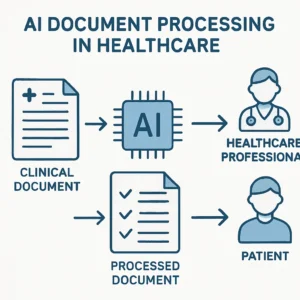
Document classification software finds applications in a variety of industries. In healthcare, it organizes patient records, ensuring easy retrieval while maintaining confidentiality. Proper classification helps to streamline patient care by providing quick access to vital information.
In the legal field, managing case files and sensitive client data is crucial. Document classification systems enhance the management of legal documents by categorizing them according to case specifics or client names. This organization saves time and minimizes the risk of losing critical information.
Financial institutions rely heavily on documentation for regulatory compliance. By using classification software, they ensure that transactions, client data, and financial reports are appropriately handled. This enhances the accuracy and reliability of their records and meets stringent compliance requirements.
Some notable use cases include:
- Healthcare: managing patient records
- Legal: organizing case files
- Finance: handling financial documentation
- Education: streamlining academic record keeping
Each industry benefits uniquely from document classification, improving efficiency and compliance across the board.

by Markus Spiske (https://unsplash.com/@markusspiske)
Data Security and Compliance Considerations
Data security is paramount in today’s digital landscape. Document classification software plays a crucial role in safeguarding sensitive information. By categorizing data accurately, these tools ensure that sensitive documents are handled with care, reducing the risk of data breaches.
Compliance is another significant factor for organizations. Many sectors are governed by strict regulations that dictate how data should be managed. Document classification software ensures that documents meet compliance requirements, mitigating the risk of fines or legal issues.
To maximize security and compliance benefits, organizations should consider several factors. Look for software that supports role-based access controls and robust encryption features. Additionally, ensure that the software can integrate with your current security protocols.
Key security features to prioritize include:
- Role-based access controls
- Strong encryption capabilities
- Integration with existing security protocols
- Audit trails for document handling
Incorporating these features ensures that your organization not only protects its sensitive data but also complies with relevant regulations, providing peace of mind and operational efficiency.

by Mika Baumeister (https://unsplash.com/@kommumikation)
Cloud vs. On-Premises vs. Hybrid Deployment
Choosing the right deployment model is crucial for any organization. Each option—cloud, on-premises, and hybrid—has its own set of advantages. The decision should align with your business needs, budget, and security requirements.
Cloud-based solutions provide scalability and remote access. They typically require less upfront investment and maintenance. This flexibility is ideal for businesses that need to access information from various locations. However, dependency on internet connectivity is a consideration.
On-premises solutions offer more control over data. This setup is beneficial for organizations with stringent data security requirements. However, it often involves higher initial costs and ongoing maintenance. It can be less flexible compared to cloud-based options.
The hybrid model combines both cloud and on-premises elements. It offers a balance of flexibility and control. This approach can cater to businesses with specific needs, offering data security for sensitive information while maintaining the benefits of cloud accessibility.
Key considerations for deployment include:
- Scalability needs
- Security requirements
- Budget constraints
- Accessibility preferences

by Growtika (https://unsplash.com/@growtika)
Integration with Document Management Tools and Other Systems
Seamless integration is a key aspect when choosing document classification software. It should work well with existing document management tools. This ensures that information flows smoothly across your systems without disruption.
Compatibility with other enterprise systems like CRM and ERP enhances functionality. Such integration can streamline workflows and boost productivity. Ensure the software you choose can connect with your current technology stack.
Look for solutions that support API access for custom integrations. This flexibility allows you to tailor the software to your specific needs. The ability to link with cloud storage services like Google Drive is also beneficial for remote work.
Key integrations to consider include:
- Document management systems
- Customer Relationship Management (CRM) systems
- Enterprise Resource Planning (ERP) systems
- Cloud storage solutions
An integrated system fosters efficiency and improves team collaboration. It can eliminate redundancy and automate routine tasks. By ensuring all components work together, your organization can enhance its overall operational agility.

by AbsolutVision (https://unsplash.com/@codzilla_swiss)
Evaluating and Comparing Document Classification Vendors
Selecting the right vendor is crucial for a successful document classification implementation. Start by assessing the vendor’s reputation in the industry. Look for customer reviews and testimonials to gauge satisfaction levels. A strong track record is often a reliable indicator of quality service.
Next, compare the feature sets offered by different vendors. Ensure the software meets your specific business needs. Essential features might include AI-driven classification, user-friendly dashboards, and multilingual support. Remember, more features do not always equate to better value if they don’t suit your requirements.
Consider the vendor’s customer support and training offerings. Responsive support and comprehensive onboarding can make a significant difference. It ensures your team can maximize the software’s capabilities.
Key factors to evaluate in vendors include:
- Industry reputation and customer reviews
- Feature set and customization options
- Customer support and training
- Update policies and frequency of software enhancements
Finally, examine the vendor’s cost structure and flexible pricing options. Some may offer a demo or trial period, allowing you to test their product firsthand.

by Thomas Kinto (https://unsplash.com/@thomaskinto)
Cost Considerations and ROI
When evaluating document classification software, cost plays a pivotal role. Initial purchase price is just one aspect. Consider ongoing expenses like maintenance, support, and upgrades. These recurring costs can significantly impact the total cost of ownership over time.
It’s essential to assess the return on investment (ROI) the software promises. Look at potential savings from increased efficiency and reduced manual work. Automated systems often lead to fewer errors and faster processing, contributing to ROI.
Calculate savings from potential risk mitigation and improved compliance. Proper classification aids in avoiding costly regulatory penalties. Additionally, enhanced data security can prevent expensive data breaches.
Cost considerations include:
- Initial purchase price
- Ongoing maintenance and support fees
- Potential savings and efficiency improvements
- Risk mitigation and compliance benefits

by Carlos Muza (https://unsplash.com/@kmuza)
Ultimately, the right software should offer a clear path to a positive ROI. Align these savings with your organization’s goals for maximum impact. Balance cost with the potential benefits to make an informed decision.
Implementation Best Practices
Implementing document classification software requires a well-planned approach. Proper setup ensures you get the most from your investment. Start by involving key stakeholders early in the process. Their insights can guide customizations and ensure alignment with business goals.
Training is crucial for user adoption. Educate your staff thoroughly on new workflows and features. This will minimize resistance and enhance productivity. A well-informed team can leverage software capabilities to the fullest, driving better outcomes.
Regularly review and refine classification rules. Businesses evolve, and so should document categorizations. Continuous evaluation helps maintain relevance and accuracy. This ensures the software remains a valuable asset over time.
Consider the following best practices:
- Engage stakeholders in the planning phase
- Provide comprehensive training for all users
- Regularly update and refine classification rules
- Conduct post-implementation reviews to identify improvement areas

by Van Tay Media (https://unsplash.com/@vantaymedia)
By adhering to these practices, organizations can enhance the value derived from their document classification software. A thoughtful approach to implementation prevents common pitfalls and maximizes software utility.
Top Document Classification Software Solutions (2024)
The document classification software landscape is vibrant with powerful solutions. Each year, new features and updates enhance these tools. Knowing the top solutions helps in making informed decisions. In 2024, several standout options cater to diverse business needs.
Software A excels with robust AI capabilities. Its machine learning algorithms are designed for efficient and precise document categorization. This tool integrates seamlessly with popular enterprise systems, providing a smooth workflow.
Software B is known for its user-friendly interface. It simplifies complex classification tasks, making it ideal for teams without technical expertise. Users appreciate its customizable features and extensive support resources.
Consider these key features:
- Advanced AI algorithms
- Seamless system integrations
- User-friendly design
- Customizable classification rules

by Kelsey Todd (https://unsplash.com/@sparkledump)
Software C stands out due to its strong security protocols. Businesses handling sensitive data find its encryption and access controls invaluable. Additionally, its compliance with various regulations makes it a wise choice for regulated industries.
Software D provides exceptional scalability. It supports growing data volumes efficiently, making it suitable for expanding businesses. Its cloud-based deployment offers flexibility and remote accessibility, crucial for modern workplaces.
Additional noteworthy features:
- Robust security measures
- Regulatory compliance support
- Scalability and performance efficiency
- Cloud and hybrid deployment options

by 2H Media (https://unsplash.com/@2hmedia)
When evaluating software for your organization, these top solutions are excellent starting points. They offer a blend of advanced features, ease of use, and strong performance metrics. Selecting the right tool is essential for optimizing document management processes and enhancing organizational efficiency.
Frequently Asked Questions
What is document classification software?
Document classification software automates the sorting and categorization of documents. It uses AI and machine learning to identify content patterns and assign categories.
Why is document classification important?
Classification optimizes document organization. It reduces manual work and ensures easy access to important information. This boosts productivity and efficiency.
How does AI enhance document classification?
AI improves accuracy and speed. Machine learning algorithms learn from data patterns. This allows for more precise categorization over time.
What should I consider when choosing software?
Evaluate integration capabilities, ease of use, and scalability. Consider the vendor’s support services. Check for compliance with industry standards.
Does this software support various document types?
Yes, most modern software supports diverse formats like PDFs, images, and text files. This flexibility is essential for varied business needs.
How secure is document classification software?
Security features like encryption and access controls safeguard sensitive data. Always choose software that aligns with your organization’s security standards.
- Document classification benefits
- AI role in classification
- Integration and support considerations
- Document format support
- Security features
These FAQs provide insights into document classification software. For detailed questions, consulting vendors directly is advised.
Conclusion: Choosing the Right Document Classification Software
Selecting the right document classification software is crucial for effective document management. Start by assessing your organization’s needs and identifying critical features. Look for software that integrates seamlessly with your existing systems. Compatibility will ensure a smooth workflow and reduce disruptions.
Evaluate the scalability of the software to accommodate future growth. As your organization expands, your document management needs may increase. Scalable solutions can adapt to larger data volumes without performance issues.
Security and compliance should be top priorities. Ensure the software meets your industry’s regulatory standards and provides robust data protection features. This prevents unauthorized access and secures sensitive information.
Lastly, consider the total cost of ownership, including initial purchase, maintenance, and support fees. Conduct thorough vendor evaluations to determine the best value for money. By taking these factors into account, you can make an informed decision that supports your organizational goals.